Configuring the vehicle settings
Configure driving-related features and other vehicle settings.

Caution
Make sure you stop the vehicle before changing settings to ensure safety.
- Vehicle settings can be changed only when the vehicle is turned on.
- The screen may differ depending on the vehicle model and specifications.
- Available settings may differ depending on the vehicle model and specifications.
- Some features may not be supported, depending on the climate control system.
- Profile linking may not be supported for some features.
- On the Home screen, press Settings ▶ Vehicle.
The vehicle settings screen appears.
- Configure the settings as required.
- Press
 on the screen or press the button on the control panel, enter a search term, and then select the item to run.
Driver assistance (if equipped)
Configure settings for various driver-assist systems, to ensure safety.
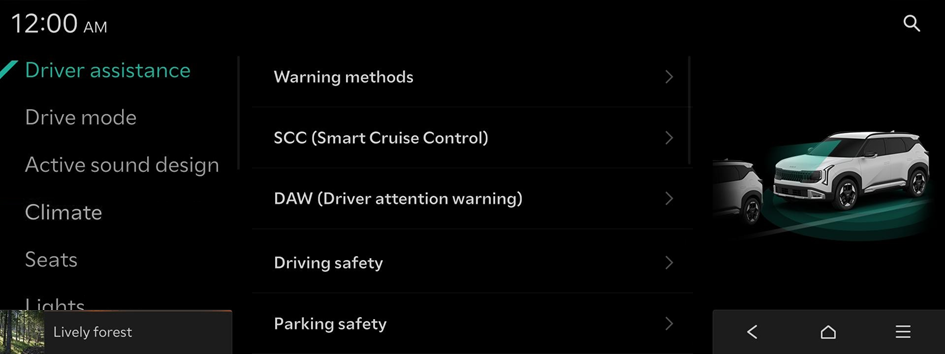
- Available settings may differ depending on the vehicle model and specifications. Refer to the car owner's manual for further information about the features.
- To switch the view mode for driver assist features between the image view and list view, press
 ▶ Change menu display. The default mode is the image view.

Warning
- • Be sure to always check the road conditions while driving. The Driver Assistance system helps you drive safely and conveniently. Relying solely on the function may cause violation of traffic rules and regulations, resulting in an accident.
- • Be sure to control the vehicle by your judgment and keep traffic regulations for safety. When the function is active, drive the vehicle with keeping eyes forward and checking the surroundings.
- • Not all warnings or functions are necessary when they are active, and they do not replace the driver discretion under any circumstances. Stay focused on the road while driving.
Caution
Be sure to always check the vehicle surroundings while driving. The equipped cameras and sensors may not operate properly under all driving conditions.
Warning methods
The warning methods for the Driver Assistance systems
- • Warning volume: The volume of the warning sounds
- • Haptic warning: Activation of the steering wheel vibration warning
- • Lane Safety audible warning Off: Deactivation of the Lane Safety audible warning, even if both warning volume and haptic warning are On.
- • Driving safety priority: Lowering of all other audio volumes when a driving safety warning sound is played
- • Parking safety priority: Lowering of audio volumes when a parking assist view is active
SCC (Smart Cruise Control)
The properties of the Smart Cruise Control system
- • Based on driving style: Automatic adjustment of the Smart Cruise Control system settings based on driving style
- To reset the SCC (Smart Cruise Control) settings, press Reset.
DAW (Driver attention warning)
The properties of the DAW (Driver Attention Warning) system
- • Leading vehicle departure alert: Notification of the driver when the leading vehicle drives on
Warning
Be sure to always check the road conditions ahead or surroundings before departure. An accident caused by distracted driving can be prevented.
Driving safety
The properties of the Driving Safety system
- • Forward safety: Assistance in collision avoidance. The system provides a warning and actively controls the vehicle when a risk of forward collision is detected.
- • Forward safety warning timing: The timing of the forward safety system warnings
- • Forward cross-traffic safety: Assistance and warning when risk of forward cross-traffic collision is detected
- • Forward/Side safety: Collision avoidance by provision of a warning and vehicle control when a risk of forward or side collision is detected
- • Lane safety: Automatic adjustment of the steering wheel to keep the vehicle within the boundaries of its lane
- • Blind-spot view monitor: Display of blind-spot view in the cluster when operating the turn indicator
- • Blind-spot safety: Warning on detection of a risk of blind-spot collision, and automatic vehicle control while departing a parallel parking spot
- • Safe exit: Provision of a warning and door control when a risk of blind-spot collision is detected while exiting the vehicle
Parking safety
Properties of the Parking Safety systems
- • Camera settings: The properties of the camera
- • Surround view monitor auto On: Automatic activation of the surround view monitor when the parking distance warning is active
- • Auto PDW (Parking Distance Warning): Automatic activation of PDW (Parking Distance Warning) at low speeds
- • Rear safety: Provision of a warning and vehicle control when a risk of collision is detected while reversing
- • Rear cross-traffic safety: Provision of a warning and vehicle control when a risk of rear cross-traffic collision is detected while reversing
Warning
- • Even if your vehicle is equipped with a driver assistance system, always check for objects around the vehicle when driving or parking. Relying on the Parking Safety system may cause an accident. Accordingly, be sure to control the vehicle by your judgment.
- • When the sensors cannot detect any obstacles due to the detection limit, it may cause an accident. Be sure to always check the surroundings while parking.
Drive mode (if equipped)
You can change the vehicle settings for driving conditions.
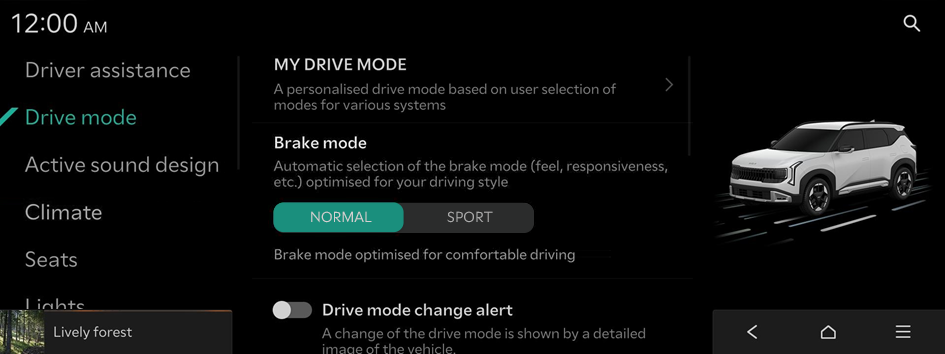
- Available settings may differ depending on the vehicle model and specifications.
MY DRIVE MODE
A personalised drive mode based on user selection of modes for various systems
Brake mode
Automatic selection of the brake mode (feel, responsiveness, etc.) optimised for your driving style
Drive mode change alert
A change of the drive mode is shown by a detailed image of the vehicle.
ECO mode climate control
Decrease the energy consumption by reducing the heating and cooling power of the climate control system.
Active sound design (if equipped)
A synthetic driving sound for EVs. Please select a volume.
- Available settings may differ depending on the vehicle model and specifications.
Climate (if equipped)
You can configure the operation environment for climate control system.
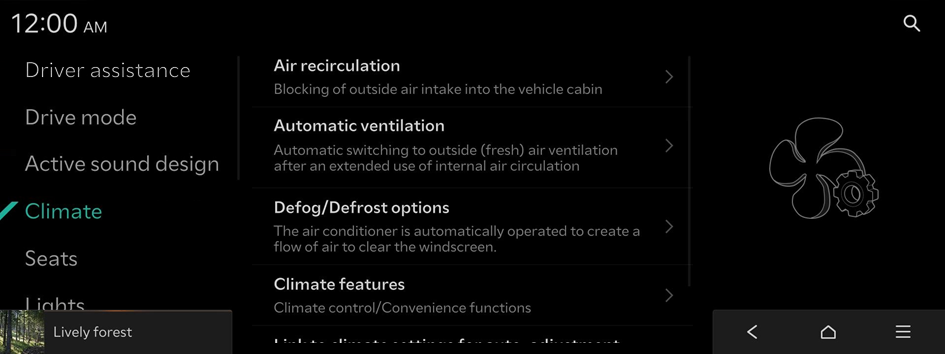
- Available settings may differ depending on the vehicle model and specifications.
Air recirculation
Blocking of outside air intake into the vehicle cabin
- • Activation on washer fluid use: Washer fluid scent is automatically prevented from entering the cabin.
- • Activation upon entering a tunnel: Automatic closing of windows and activation of internal air circulation upon entering a tunnel
Automatic ventilation
Automatic switching to outside (fresh) air ventilation after an extended use of internal air circulation
- • Auto dehumidify: Automatic switching to outside (fresh) air ventilation to decrease humidity after an extended use of internal air circulation
Defog/Defrost options
The air conditioner is automatically operated to create a flow of air to clear the windscreen.
- • Defog/Defrost: Activation of fresh air ventilation and A/C to remove windshield moisture quickly
- • Auto defog: Automatic activation of the climate system to prevent fog on the windscreen
Climate features
Climate control/Convenience functions
- • Air conditioner auto-drying: After the vehicle is turned Off, the fan will run automatically to dry the inside of the air conditioner to prevent mold growth.
- • Lock rear climate controls: Disabling of rear seat air condition controls
- • Rear climate auto Off: The rear climate system is turned Off automatically when the rear seats are not occupied.
- • ECO mode climate control: Decrease the energy consumption by reducing the heating and cooling power of the climate control system.
- • Climate touchscreen control restriction: The touch function will operate only on a part of the climate touchscreen.
Warmer/ventilation based on climate settings
Automatic adjustment of the steering wheel warmer and the driver's seat warmer/ventilation feature based on the climate settings
- • Steering wheel warmer: The steering wheel warmer is automatically adjusted based on the climate settings.
- • Driver seat warmer/ventilation: Automatic adjustment of the driver seat warmer/ventilation feature based on the climate settings
Seats (if equipped)
You can set to use various features (motions and warmer control for the driver's seat, rear seat, and steering wheel) that are related to the seats and steering wheel.
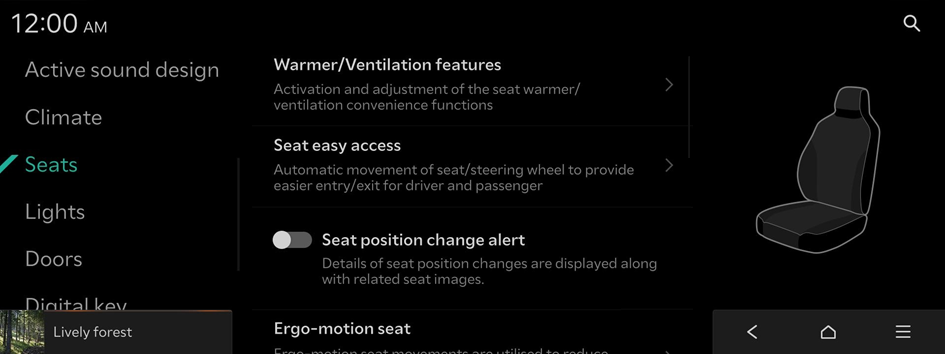
- Available settings may differ depending on the vehicle model and specifications.
Warmer/Ventilation features
Activation and adjustment of the seat warmer/ventilation convenience functions
Warmer/ventilation based on climate settings
Automatic adjustment of the steering wheel warmer and the driver's seat warmer/ventilation feature based on the climate settings
- • Steering wheel warmer: The steering wheel warmer is automatically adjusted based on the climate settings.
- • Driver seat warmer/ventilation: Automatic adjustment of the driver seat warmer/ventilation feature based on the climate settings
Seat easy access
Automatic movement of seat/steering wheel to provide easier entry/exit for driver and passenger
- • Easy seat (fwd/bwd) access: The automatic movement of the driver's seat is disabled when entering and exiting the vehicle.
- • Passenger seat easy access: The passenger seat is automatically moved when the passenger enters or exits the vehicle.
- • Steering easy access: The steering wheel is automatically moved when the driver enters or exits the vehicle.
Seat position change alert
Details of seat position changes are displayed along with related seat images.
Ergo-motion seat
Ergo-motion seat movements are utilised to reduce fatigue, support driver comfort, and increase driver awareness and safety.
- • Comfortable stretch: Comfortable stretch options, that use seat movements to help reduce pelvic and back fatigue.
- • Smart Posture Assist: Assistance in maintaining a comfortable posture by adjusting the hips and waist after 1 hour of driving
Lights (if equipped)
You can configure the settings for vehicle lights.
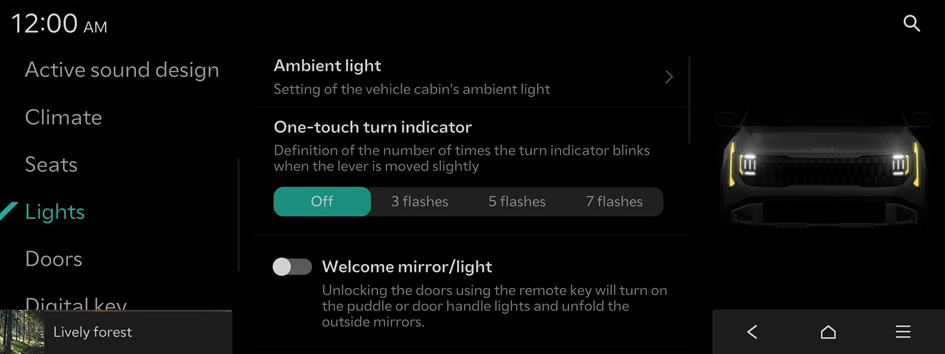
- Available settings may differ depending on the vehicle model and specifications.
Ambient light
Setting of the vehicle cabin's ambient light
- • Brightness: Adjust the brightness of the cabin's ambient light.
- • Colour: Adjusts the colour of the ambient light.
- • Link to drive mode: The colour of the ambient light changes according to the selected drive mode.
- • Dimming under darkened conditions: Automatic dimming of the ambient light under darkened conditions
One-touch turn indicator
Definition of the number of times the turn indicator blinks when the lever is moved slightly
Welcome mirror/light
The condition under which the outside mirrors will unfold and the puddle or door handle lights will turn on automatically.
Headlight time-out
The exterior lights turn Off approximately 15 seconds after leaving the vehicle and closing the doors.
HBA (High Beam Assist)
Assistance in reducing high beam glare to oncoming vehicles
Intelligent High Beams
The speed at which the intelligent headlights (high beams) activate. Beams will adjust to prevent blinding near by vehicles.
Doors (if equipped)
You can configure the operation environment for the tailgate and doors.

- Available settings may differ depending on the vehicle model and specifications.
Auto lock
Definition of a condition for all doors to be locked automatically
- • Enable on speed: Definition of a condition for all doors to be locked automatically
- • Enable on speed or shift: Definition of a condition for all doors to be locked automatically
Auto unlock
Definition of a condition for all doors to be unlocked automatically
- • Enable on shift to Park (P): Definition of a condition for all doors to be unlocked automatically
- • At vehicle Off: Definition of a condition for all doors to be unlocked automatically
- • Off: Deactivate the automatic unlocking of all doors.
Power Tailgate (if equipped)
The Power Tailgate button can be used to automatically open/close the tailgate.
Power Tailgate Opening Speed (if equipped)
Definition of the Power Tailgate opening and closing speed.
Power Tailgate Opening Height (if equipped)
The opening height of the Power Tailgate
Smart Tailgate (if equipped)
The tailgate will be automatically opened when approaching the tailgate with the Smart Key.
Remote window control (if equipped)
Enable/disable the remote window control function.
Digital key (if equipped)
Register a digital key to your smartphone or an NFC-enabled key card, to use the smartphone or card as a smart key.
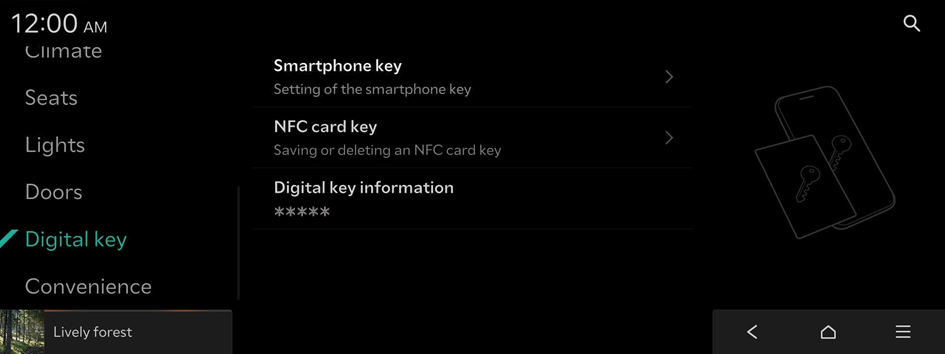
- Available settings may differ depending on the vehicle model and specifications.
Smartphone key
Setting of the smartphone key
- • My Smartphone Key: Saving/deleting of My Smartphone Key
- • Shared keys: Display of shared smartphone keys
- A digital key can be shared by a maximum of three smartphones. Ensure the smartphones were made by the same manufacturer.
NFC card key
Saving or deleting an NFC card key
- • Enable card key: Start the vehicle and lock/unlock doors using a card key.
Digital key information
Shows the serial number of the authentication controller.
Convenience (if equipped)
You can configure the features for convenience such as wireless charging.
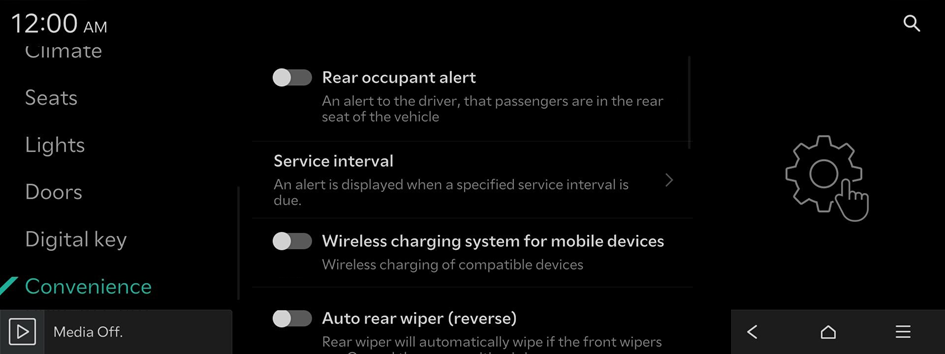
- Available settings may differ depending on the vehicle model and specifications.
Rear occupant alert
An alert to the driver, that passengers are in the rear seat of the vehicle
Service interval
An alert is displayed when a specified service interval is due.
- • Enable service interval: An alert is displayed when a specified service interval is due.
- • Distance: A service inspection notification is provided after driving the set distance.
- • Interval: A service inspection notification is provided after the set amount of time has passed.
- To initialise all service interval reminder settings, press Reset.
Wireless charging system for mobile devices
Wireless charging of compatible devices
Auto rear wiper (reverse)
Rear wiper will automatically wipe if the front wipers are On and the gear position is in reverse.


